Release
Complete the input at the end of the motion as the ball is leaving the fingertips.
Watch: wrist snaps into the follow-through.This is a universal MyTEAM shooting system for any lineup. The goal is not to copy one player's timing. It is to build repeatable habits, learn every rotation card, read the game's feedback and know which players you can trust when a game gets tight.
The cue setting moves your target point through the animation. It does not create one universal millisecond timing. Every card, catch, stamina level and shot type can change the total motion.
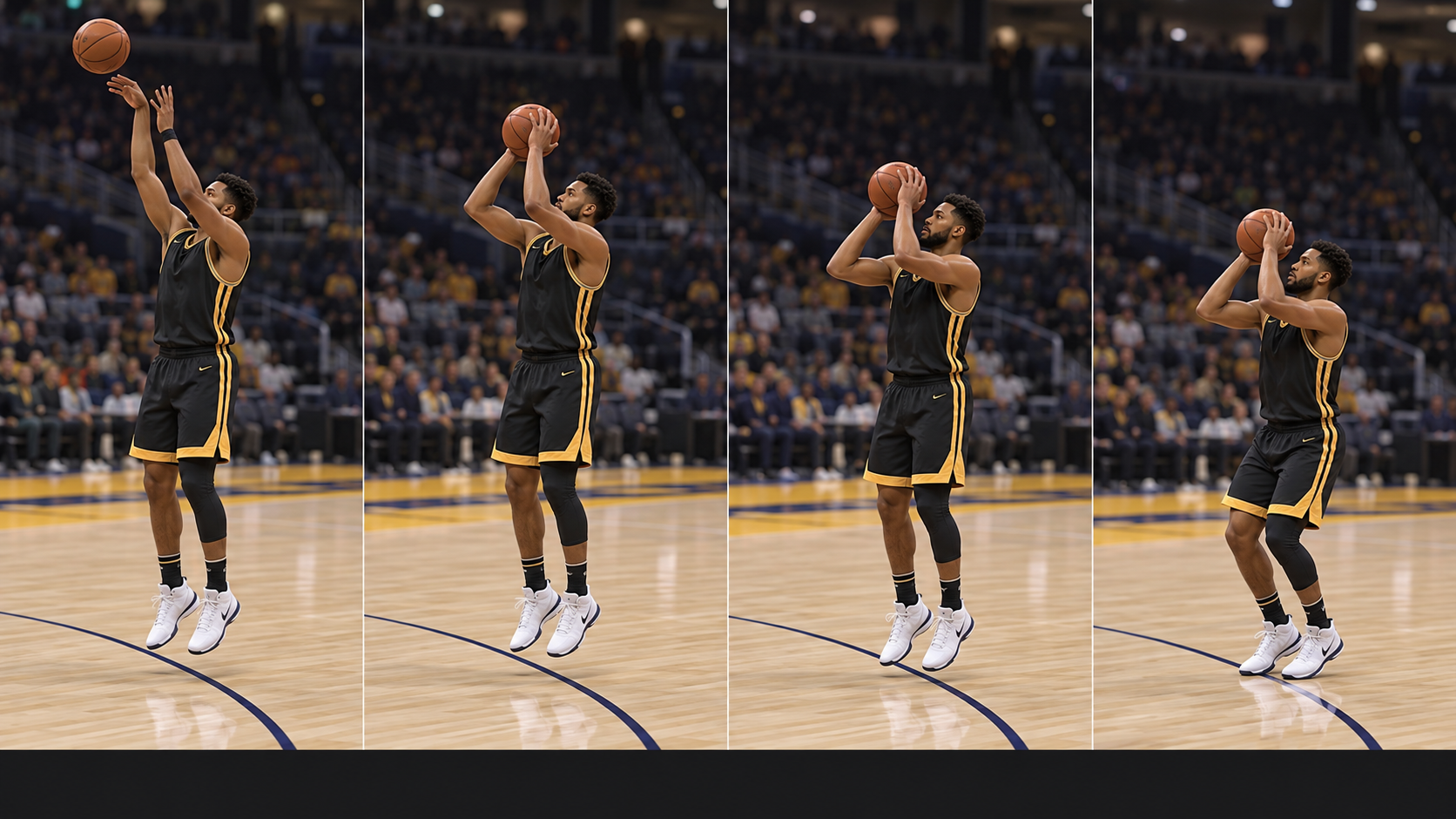
Complete the input at the end of the motion as the ball is leaving the fingertips.
Watch: wrist snaps into the follow-through.Complete the input as the shooting arm starts driving the ball toward the rim.
Watch: elbow extends and wrist begins to turn.Complete the input as the ball reaches its loaded position.
Watch: ball settles near the forehead.Complete the input as the player begins rising into the shot.
Watch: knees extend and feet leave the floor.Live now on PlayStation 5 and Xbox Series X|S. PC and Nintendo Switch 2 receive Patch 2.0 on October 16.
Open shots from quality shooters are more effective, and mid-range shooting received a boost in competitive modes. Overall three-point percentages were also rebalanced, so do not assume every old result or percentage still represents the current game.
Ghost contests were corrected. A defender now needs to be more squarely in front of the shooter, and their position at the release matters. Keep creating real separation instead of forcing shots just because nearby defenders should have less influence.
Shot-range checks for several badges were improved. Shot Artist, Calibrated and Navigator also received timing-window changes, while Navigator and Airspace now allow defense to matter more. Re-lab any card that depends on those effects.
Use this as a clean starting point. It is built for MyTEAM stick and rhythm shooting, not for one specific team.
Use the playbook and freelance that fit your lineup. The lab is about repeatability, not forcing everyone into one offense.
Use the visual feedback like a diagnostic tool. Do not guess.
Push is the baseline visual cue. Watch the player's body and release point, not just the meter. Learn what the release looks like at the moment you should complete the shot.
Your timing read begins before the ball reaches the release point. Watch whether the player catches high or low, plants, hops or has to turn toward the basket. Those setup animations can add a dip or delay, so adjust to the animation you actually receive.
A very quick jumper is not automatically the best jumper. A slightly slower release that flows cleanly from the catch and footwork can be easier to repeat under pressure. Grade the full motion, not just release speed.
With rhythm shooting, separate the two problems. If the game says the shot timing is early or late, fix that first. Once the timing is stable, clean up Tempo. Do not change both variables at the same time.
Different cards have different releases. A jumper that feels automatic on one guard may feel completely different on your wing or center. Give every player their own reps.
The same card can feel different from the corner, wing, top and deeper range. Treat distance as part of the timing pattern.
Several shooting badges now determine range more accurately. Test the corner, wing, top and deeper range separately, then use the badge feedback to mark where each card's boost actually activates. Do not rely on a pre-patch line on the floor.
Use the meter as a learning aid, but keep shot feedback on for all shots. When the visual cue becomes automatic and misses are predictable, remove the meter and trust the player's animation. The referenced tutorial reports a larger green window with the meter hidden, so test the change in your own mode and connection.
New lab notes from Kevin Cruz's NBA 2K27 shooting tutorial, translated into a repeatable MyTEAM routine.
Read the chain in that order. A low catch, body turn, extra plant or hop changes when the familiar release arrives. Treat the setup as part of the jumper instead of calling every change a random speed-up or slowdown.
Lab standstill catches, catches after movement, both hesi directions and pull-ups separately. Keep the moves that flow naturally into each card's feet and remove the combinations that force an awkward reset.
Fatigue can slow the animation, while lost adrenaline can make the available green window less forgiving. Avoid wasting both with repeated bursts or dribble spam before the shot you want.
Use coverage and timing feedback to separate a bad read from a bad release. The meter can come off once you recognize the cue, but the feedback should stay on while you are building the habit.
Button shooting can be the reliable option for unfamiliar cards. Use rhythm shooting on players you have fully labbed when its tempo-based risk and reward actually helps the shot.
Pull the right stick down to begin the shot. Start the upward motion as the player reaches the set point, match the shooting motion, then finish through the chosen visual cue. Diagnose the first timing input before changing the upward tempo.
Run this in MyTEAM practice or freestyle with the actual players in your lineup.
Make 10 from the left corner and 10 from the right. Focus on the visual release point first.
Make 10 on each wing. Note whether the shot feels faster or slower than the corner.
Make 10 from the top, then 10 from a comfortable deeper spot. The deeper spot is for learning distance, not forcing bad shots in games.
Use this to decide who actually belongs in your rotation.
Practice is only useful if it changes how you play.
Put your best Rhythm Fit shooters into spots where they get the shots you practiced. Do not ask every card to be a three-level scorer.
Watch how your opponent defends screens, corners and help rotations. Use the first few minutes to identify which practiced shots will actually be available. CPU defenders now begin with looser coverage and raise their intensity after a scorer gets going, so expect early space to shrink.
If you are missing, do not change every setting. Read the feedback and correct one thing at a time.
Close games with the cards whose releases you have earned confidence in. Familiar timing beats hype.
Record who you shot well with, where the misses came from and whether the problem was Timing, Tempo, shot selection or role fit. Use that grade to shape the next practice session and future roster decisions.
You are completing the release too soon. Re-watch the Push cue and delay the finish slightly. Do not speed up the whole motion.
You are holding the release too long. Identify the visual push point and complete the motion sooner.
Your release point is close, but the rhythm of the stick motion is inconsistent. Keep the same timing and smooth out the second motion.
Distance and angle are changing your read. Return to the six-spot drill with that one card.
Stop treating the lineup like one jumper. Isolate that card and build a separate timing memory.
Check shot quality, stamina, contests and whether you are rushing. After Patch 2.0, also check whether the defender was squarely in front of the shooter at release. A correct lab rep does not make a bad in-game shot good.